NVIDIA’s developer walkthrough uses a YuMi robot, frontier AI, and Isaac Sim to turn CAD files into a testable digital model.
A robot’s computer model is not ready for simulation just because it looks right. It also needs joints, masses, collision shapes, friction, and other properties that determine how it moves and touches objects.
NVIDIA’s demonstrated workflow uses frontier AI to help prepare those details. It starts with computer-aided design files for an ABB Robotics YuMi robot and ends with simulated pick-and-place tasks in NVIDIA Isaac Sim.
The walkthrough is a developer example of this process. It shows how AI can assist with setup, while developers review the results, correct problems, and decide whether the model is suitable for a particular test.
From CAD files to a usable robot model
The process begins with STEP files, a common format for engineering designs. These files describe the robot’s geometry, but they do not automatically provide everything a physics simulator needs.
The workflow converts that geometry into OpenUSD. OpenUSD is a format that can hold a 3D scene’s shapes, structure, materials, and simulation properties in one representation.
NVIDIA’s Omniverse tools and SimReady Foundation specifications guide the conversion. SimReady defines requirements for preparing digital assets for particular simulation tasks. Its checks can flag problems with structure, materials, joints, and physics settings.
The AI model helps interpret robot files, specifications, images, videos, and tool instructions. In this demonstration, NVIDIA uses GPT-6 Astra as one example of a frontier AI model. It can help write Python code that calls Omniverse libraries and communicates with a live Isaac Sim application.
That assistance does not remove the need for engineering review. Developers inspect the simulation results and validation feedback, identify issues, and refine the asset before moving to the next step.
What the five steps do
First, the workflow imports the YuMi’s STEP files and creates an OpenUSD asset. Reference images and videos help guide the robot’s visual appearance.
The second step checks that appearance. The AI-assisted process adjusts materials, colors, metallic response, and roughness while comparing the digital model with the supplied references. NVIDIA describes these material settings as visual estimates, not measured reconstructions.
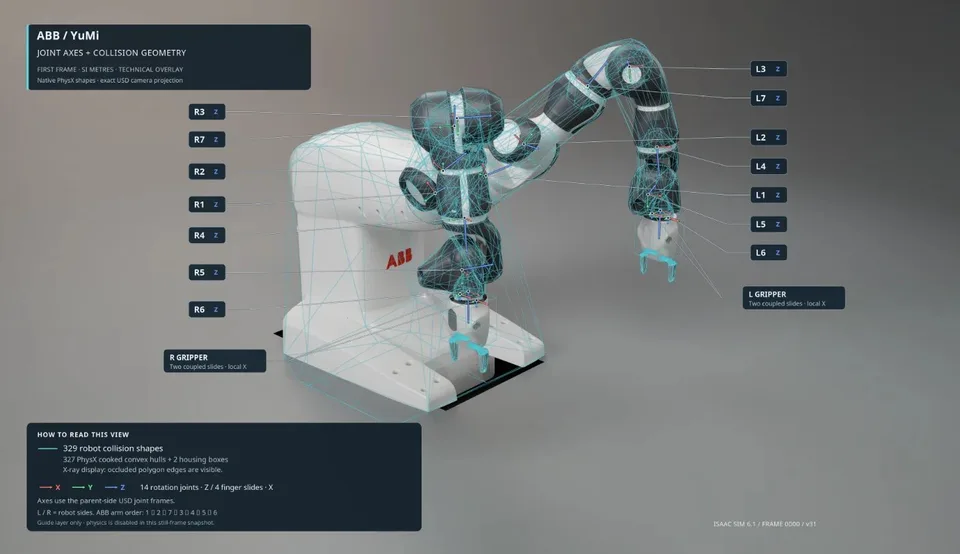
Third, the workflow adds physics properties. These include joint axes and limits, rigid bodies, collision geometry, masses, centers of mass, inertia, and gripper behavior.
These details matter because a robot can appear correct while behaving incorrectly in a simulator. Missing collision geometry might let an object pass through a gripper. Incorrect joint settings could prevent coordinated movement. Mass and friction values affect whether a grasp stays stable.
For the YuMi example, the workflow used a public robot description to identify joint axes and the zero position. It estimated link masses from CAD geometry and adjusted them to manufacturer-specified totals. It treated parts as solid objects with uniform density rather than modeling internal motors, gearboxes, and wiring separately.
The workflow also assumed static friction of 0.8 and dynamic friction of 0.6. NVIDIA says those values were not calibrated against measurements of the physical gripper and object contact.
Fourth, the system runs validation checks. NVIDIA says these checks examined units, dependencies, geometry, materials, rigid bodies, joints, drives, and articulation against SimReady Foundation requirements.
Isaac Sim checks also examined scale, orientation, part placement, gripper mounting, material coverage, and texture dependencies. The workflow tested motion, contact, release, and collisions along selected trajectories.
At each stage, developers review the results and fix problems before continuing. The AI can reduce repetitive preparation work, but it does not replace expert correction or decisions about whether the assumptions are good enough.
What the final demonstration showed
The final task used both YuMi arms and grippers to move colored cubes. Each arm grasped a cube, lifted it, held it for two seconds, moved it to a matching color target, and released it. The arms then picked up the cubes again and placed them inside a box.
NVIDIA reports four completed pick-and-place cycles during a 122.2-second physics simulation. The test cubes measured 45 millimeters and weighed 40 grams.
The cubes stayed in the grippers through simulated contact and friction. The workflow did not use attachment joints, artificial kinematic holds, or direct updates to the cubes’ positions.
A separate demonstration modeled a Sharpie marker from a reference image. The simulated YuMi picked it up from a tabletop and released it into a tray. That example also relied on estimated dimensions, mass, and collision shapes.
These results show that the prepared digital asset performed selected tasks under the chosen simulation settings. They do not show that a physical YuMi would complete the same tasks reliably.
What the demonstration does not establish
The checks confirmed that the simulation was configured consistently for the tested scenes. They did not establish that the model matches real-world robot dynamics or that the robot would avoid collisions in every possible pose.
The friction values, estimated masses, collision shapes, and other properties were not calibrated against physical YuMi measurements. A mismatch can matter in tasks involving delicate contact, unusual objects, or tight clearances.
The demonstration also does not establish reliable transfer to other robot models, AI models, prompts, or physical hardware. NVIDIA says results can vary with the model, reasoning effort, and prompts used.
The practical promise is narrower than “AI can prepare robots.” This workflow may reduce repetitive work when turning CAD files and reference materials into assets that engineers can configure, validate, and test in simulation.
Before using such a model to guide a physical robot, engineers would need to compare its assumptions with real measurements and test the resulting behavior on hardware. Until then, the YuMi pick-and-place result is a simulation checkpoint—not evidence that the robot is ready for the factory floor.