Ramps, barriers, guards, and replacement rollers can solve specific household issues—but only when the design fits your exact vacuum.
A 3D-printed part can help a robot vacuum cross a raised threshold, avoid dangerous cables, stop getting trapped under furniture, or keep cleaning after a worn brush breaks. It is a practical repair option, not a universal upgrade.
How-To Geek’s guide describes several designs shared through repositories such as MakerWorld. The designs cover navigation aids, protective barriers, and replacement cleaning parts. The key question is not whether a part exists. It is whether it fits your robot vacuum and your home.
What can a printed part fix?
A gradual ramp can help a robot vacuum cross a threshold or another obstacle that is too tall for its wheels. How-To Geek says the ramp should be gradual enough for the vacuum to climb safely and strong enough to support a person who steps on it.
That strength warning matters. A ramp that holds a small robot may still crack, slide, or tip when someone walks over it. Check its width, slope, grip, and placement before leaving it in a walkway.
The opposite problem is also common: the vacuum reaches places where it should not go. A bumper extension can make the robot slightly wider or longer, stopping it from disappearing under furniture or passing into an area where it can become trapped.
These extensions are highly model-dependent. How-To Geek points to designs for several Roborock models, as well as SharkIQ, Roomba, and Eufy vacuums. That does not mean one design will fit every model from those brands.
A clothes-drying rack can create another trap. Some robot vacuums can wedge themselves against the rack’s legs, leaving the machine “beached” until someone finds it. The guide describes printed riser feet, guards, and parts that attach to a rack, including adjustable designs for different dimensions.
For cable-filled spaces, a small printed barrier may be more useful than another software setting. Many robot vacuums treat thin cables as debris and may try to pull them into the brush. A physical wall can keep the robot away from the cable area entirely.
This is especially useful around desks, entertainment centers, and charging areas. But the barrier must not create a new trip hazard or block the robot from returning to its dock.
Printed brushes can lower replacement costs
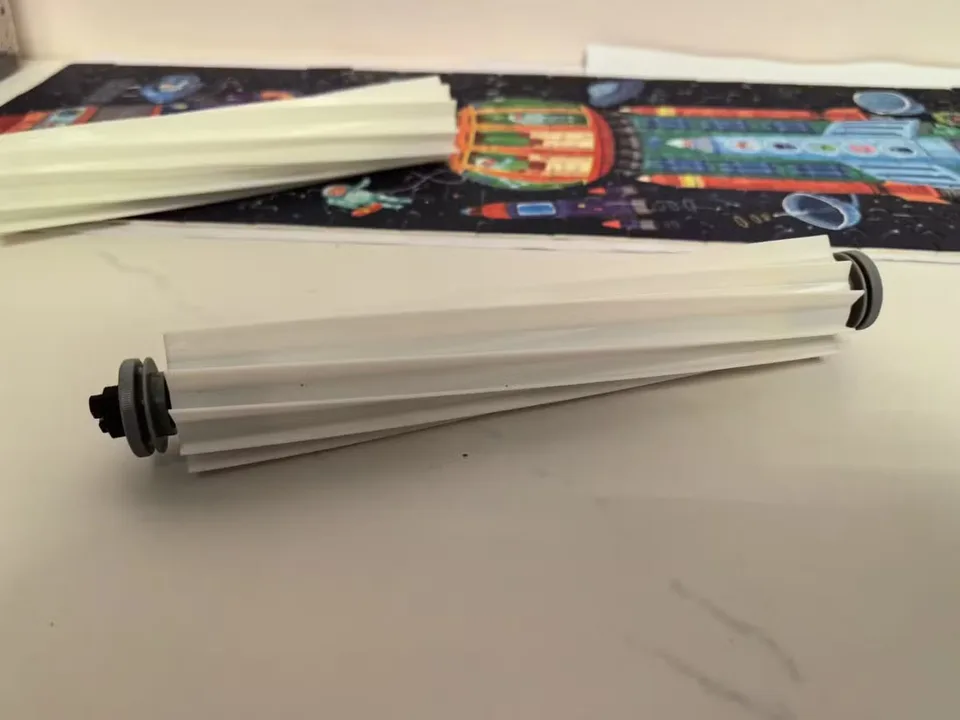
3D printing can also produce replacement cleaning parts. Robot vacuums use small side brushes to sweep debris toward the machine, while a larger sweeper roll carries debris into the vacuum’s intake.
How-To Geek describes printable replacements for both types. The examples include designs for specific Xiaomi, Shark, Dreame, Roborock, iRobot, and other cleaners. Some replacement brush designs use cheap broom bristles rather than printing the entire brush.
The potential savings are straightforward: the guide says some printed replacements cost a fraction of buying a new part and can avoid waiting for shipping. But no specific prices are provided, so there is no honest single total cost.
If you already own a 3D printer, your cost is mainly printing material, plus your time and any failed prints. If you do not own one, buying a printer just to make one vacuum part could cost far more than ordering an official replacement. A local maker space or print service may be cheaper, but the final price depends on the part and the service.
The design file may also have its own availability or licensing terms. Check those details before selling copies or using a file commercially.
What should owners check first?
Start with the exact vacuum model, not just the brand. Look for the model number on the machine, dock, packaging, or companion app, then match that number to the design listing.
Before printing, compare the design’s dimensions with your vacuum. Check wheel clearance, brush movement, bumper travel, charging contacts, sensors, and the robot’s ability to open or close its dustbin. A part that blocks a sensor or catches on a wheel can make navigation worse.
For a ramp, measure the height of the threshold and the available floor space. A ramp that is too steep may not solve the problem. For a bumper extension, confirm that it will not prevent the robot from reaching its dock or turning in narrow areas.
For replacement brushes and sweeper rolls, check the attachment point and rotating clearance by hand before starting a cleaning cycle. The part should not scrape the body, rub against the floor, or interfere with the brush housing.
Material and construction also matter. A decorative printed part does not need the same strength as a ramp or a structural riser. Follow the design maker’s instructions for dimensions, fastening, and print settings when those instructions are provided.
Finally, check the vacuum manufacturer’s guidance. The supplied reporting does not establish whether third-party printed parts affect every manufacturer’s warranty or safety rules. If a part changes a wheel, brush, bumper, charging area, or sensor, keep the original part so you can remove the modification.
Should you print one?
Yes, when the problem is narrow and the design clearly matches your vacuum. A barrier for a cable area or a model-specific replacement brush can be a sensible low-cost fix, especially if you already have access to a printer.
Wait if the design has unclear measurements, no clear fit information, or could affect charging and navigation. Do not assume a popular file works because it lists the same brand.
The best next step is to identify the exact vacuum model, measure the problem area, and compare those details with the design before printing. 3D printing can make a robot vacuum more useful—but compatibility is the real product.